/ Free · Open Source · MIT

Build Your AI Chief of Staff

An opinionated framework for building your own AI operating partner using Claude Code. Drop the folder, start a conversation, and 30 minutes from now you'll have an AI that remembers who you are, what matters, what you're building, and holds you accountable to it.

Get the Starter (Free) → See how it works
No credit card · No signup · Works with Claude Code Desktop
/ What you're about to build

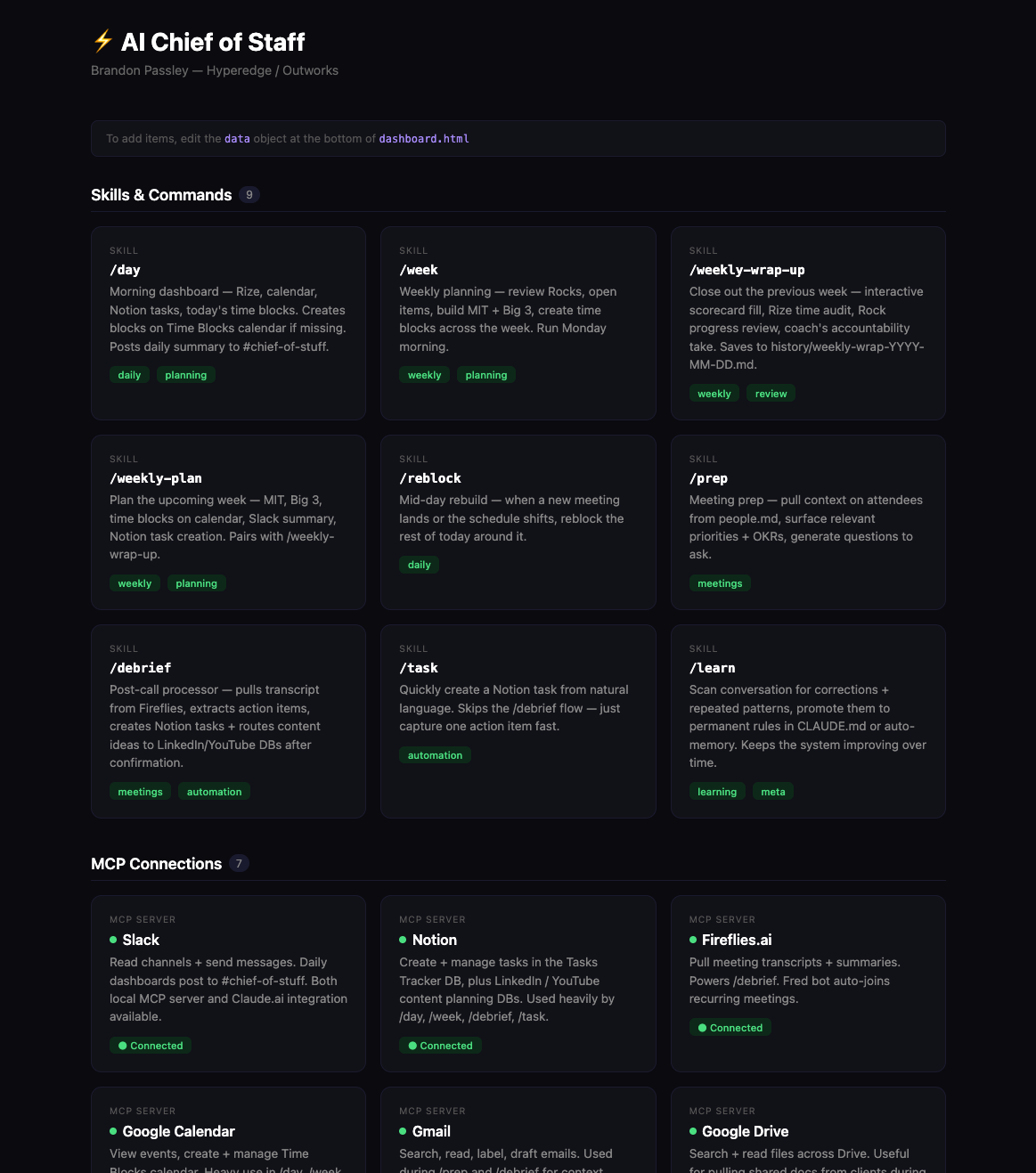
Here's what mine looks like.

This is my Chief of Staff — the slash commands I actually run, the MCPs I actually connect. Yours will look different (it should) because Claude Code generates it from your conversations, not a template.

Brandon's AI Chief of Staff dashboard showing slash commands like /day, /week, /weekly-wrap-up, /prep, /debrief and MCP connections to Slack, Notion, Google Calendar, Gmail, Google Drive
/ Why this works

Strip it down. Two ideas.

Before any layer, command, or template — these two have to be true. The rest is just execution.

/ Context, not prompts

LLMs are only as good as the context you load.

Claude, ChatGPT, every model — they all need to know who you are, what matters, and how you work. This framework is the structure: identity, strategy, operations, memory. Drop the folder once, and Claude reads it at the start of every conversation.

/ Built for non-coders

You don't need to be technical.

No terminal. No code. You install Claude Code Desktop (a chat app), drop the folder in, and start talking. Claude fills in the markdown files for you based on your conversations. If you can text a colleague, you can run this.

/ Why this exists

A Chief of Staff isn't a chatbot.

Most people try to use ChatGPT or Claude as their assistant. It doesn't stick — because every conversation starts from zero. A real chief of staff remembers, anticipates, and pushes back.

Default Chatbot
  • Forgets every conversation
  • Asks "what do you want?" every time
  • Just one tool, no integrations
  • Pure conversation, no rituals
  • Generic answers, no point of view
  • You re-explain who you are every session
Your AI Chief of Staff
  • Persistent memory across conversations
  • Knows your role, business, week, priorities
  • Connected to your tools (Notion, Calendar, Slack, etc.)
  • Repeatable rituals (/day, /week, /debrief)
  • Coaches you — pushes back when you drift
  • Gets sharper over time
The growth path — start at Layer 1, expand as you go. Click each layer to expand.
1
Foundation Start Here — Personal Chief of Staff, just for you
+

Your AI Chief of Staff knows who you are, your goals, your week, and the rituals that run your day. It reads your context at the start of every conversation and remembers what matters across sessions.

  • Identity layer (CLAUDE.md) — always loaded
  • Strategy layer (life plan, OKRs, Rocks, scorecard)
  • Memory that persists across all conversations
  • Six core slash commands (/day, /weekly-plan, /weekly-wrap-up, /debrief, /dashboard, /grow)
  • One MCP server connected (Notion or Calendar)
⏱ ~20 min to up & running 💰 Free · MIT licensed 🎯 For: anyone who wants an AI that actually knows them
2
Connected Up Next — All your services wired in
+

Your Chief of Staff becomes meaningfully more powerful with all your services connected. Slack posts daily summaries, Fireflies transcripts become tasks, Apollo enriches your network, the dashboard updates from real data.

  • 6–8 MCP servers (Notion, Slack, Calendar, Fireflies, Apollo, Drive, Gmail, etc.)
  • Custom slash commands tailored to your workflow
  • Daily Slack auto-posts with your morning dashboard
  • /debrief turns every call into action items
  • Visual dashboard.html with your real data
⏱ 1–2 weeks DIY 🎯 For: operators who want the full wedge
3
Team Future — Multi-seat with shared context
+

Every team member gets their own Chief of Staff, with shared team context (Rocks, scorecard, people DB) visible across the team. Your Chief of Staff isn't personal productivity anymore — it's an intelligence layer across the company.

  • Multi-seat Chief of Staff instances
  • Shared team context (Rocks, scorecard, people)
  • Cross-Chief of Staff commands (team-pulse, cascade-check)
  • Role-based memory (CEO's Chief of Staff thinks like a CEO)
⏱ 2–6 weeks rollout 🎯 For: 3–15 person companies
4
Systemic Future — Company data flows into the Chief of Staff
+

Connect your company systems. Your Chief of Staff becomes a company OS — sees your CRM, finance data, support tickets, ops dashboards. Workflow automation kicks in across departments.

  • CRM integration (HubSpot, Salesforce, Pipedrive)
  • Finance data (QuickBooks, Stripe, banking)
  • Support tickets / ops dashboards
  • Custom data sources via API / n8n / Make
  • AI Client Brain — client-facing Chief of Staff extension
⏱ Ongoing — each integration 2–6 weeks 🎯 For: companies wanting an AI that sees everything
5
Engine Future — Your entire company running on AI
+

Your Chief of Staff stops being a system of intelligence and becomes a system of action. AI agents execute, not just inform — running outreach, managing pipeline, drafting client work, monitoring systems.

  • AI agents that act on your data
  • Multi-system automation across departments
  • Customer/client-facing AI workflows
  • Continuous learning across the company
  • Every Layer 1–4 capability integrated
⏱ 6+ months to reach meaningful depth 🎯 For: companies serious about an AI operating layer
/ The mental model

Four pillars that make it work.

Every working AI Chief of Staff has these four pillars. The starter gives you all four out of the box.

01

Identity

Who you are. How you work. What you care about. Loaded at the start of every conversation.

CLAUDE.md
02

Strategy

What matters. Your life plan, annual OKRs, quarterly Rocks, business V/TOs.

context/life-plan.md, rocks.md, annual-plan.md
03

Operations

How you run day-to-day. Weekly scorecard, slash commands, time blocks, rituals.

context/scorecard.md, .claude/commands/*
04

Reflection

How you improve. Auto-managed memory + a durable history of every week.

memory/, history/
/ What you get

An entire Chief of Staff, in one folder.

Drop the folder into Claude Code Desktop, then talk. The whole framework loads in one read — Claude already knows what each file is for and walks you through filling them through conversation. 31 files, all open-source, all yours to edit.

31
Files
6
Slash Commands
5
Strategy Templates
1
Visual Dashboard
20 min
to up & running

You don't fill in forms. You have conversations.

Every template is built as instructions for Claude — what to ask, what good looks like, when to push back. Drop the folder, then talk to Claude the way you'd onboard a real chief of staff. Claude writes the files. Most operators have 3-5 setup conversations across their first week. None involve opening a markdown file.

"Hi! I'm setting up my AI Chief of Staff. Read the framework files in this project — they're set up but mostly empty. Then walk me through the first one."
/ Get started

Start free. Hop on a call if you get stuck.

Drop the starter on your machine and have your first conversation with Claude. If you hit a wall, I'll jump on a free 30-min call to help you get past it — operator to operator. No sales pressure.

Get Unstuck

Free · 30 min with Brandon

Stuck somewhere? Want to see what's possible at deeper layers? Hop on a free 30-min call with me — Brandon, the guy who built this.

  • 30-min screen share, no sales pitch
  • I'll help unblock whatever's stuck
  • I'll show you what your Chief of Staff could become at Layers 2–5
  • If there's a deeper need, we can talk about that too
Book a Free Call →
/ Done for you

Don't want to build it yourself?

I'll install your AI Chief of Staff for you — one function at a time. Networking, pipeline, inbox, content, or reporting. Pick the gap, I ship it in about a week.

See the installs →
Brandon Passley, Founder of Hyperedge AI

Hey, I'm Brandon.

I'm the founder of Hyperedge — we build AI operating systems for founder-led B2B agencies. I'm also co-founder of Outworks, an AI content operating system for B2B marketing teams.

I built this AI Chief of Staff for myself because running two companies, three clients, and a content engine was breaking the default tools. I've been running my own Chief of Staff daily for 6+ months — and I'm packaging the framework so other operators can run their own.

If you get stuck, book a free 30-min call with me. Operator to operator.

Hyperedge — AI operating systems for B2B agencies · Outworks — AI content operating systems · LinkedIn

Common Questions

Is this just ChatGPT with extra steps?

No, and this was built specifically for Claude Code, not ChatGPT. ChatGPT (and default Claude in the chat UI) is stateless — every conversation starts from zero. Claude Code is different: it reads the files in your project at the start of every conversation, persists memory across sessions, and connects to your tools through MCP. This framework gives Claude Code the structure to keep building context over time. It's the difference between a contractor you brief every time and a chief of staff who already knows everything about your business.

How does it actually hold me accountable? It's still just an LLM.

Because it remembers what you committed to. When you run /week and skip the goal you set last Monday, Claude reads the prior week's notes and asks why. When your /day ritual shows the same fire three days running, it pushes back. It's not magic — ChatGPT can't do this because it doesn't have your commitments loaded. This framework makes sure Claude does, and the templates explicitly tell Claude when to push instead of just agreeing with you.

Do I need to be technical to use this?

No. You don't need to know how to code. You'll use Claude Code Desktop (a chat interface, not a terminal). You won't edit markdown files by hand — Claude does that for you based on the conversations you have. The setup is opinionated and works out of the box. If you hit a technical wall (like configuring a new tool), Claude walks you through it.

What does it cost to run?

The framework itself is free (MIT-licensed, open source). You'll pay for: a Claude subscription (or Anthropic API usage — typically $20-50/month at active use), and any third-party MCP integrations you add (most are free or have a free tier). Total monthly cost for a typical Layer 2 setup: ~$30-80.

Can my whole team use this?

Eventually, yes — that's Layer 3 of the growth path. Each team member gets their own Chief of Staff with shared team context (Rocks, scorecard, people DB visible across the team). For solo operators or founders, Layer 1-2 is the right starting point.

What if I want it built for me?

I'm happy to help. Hop on a free 30-min unstuck call with me and we'll talk through what that would look like. The starter gets you to Layer 1; if you want help reaching Layers 2–5 (full service integration, team rollout, custom data work), I can scope something tailored to your stack and goals.

How is my data handled?

Your data stays on your machine. Everything runs locally through Claude Code Desktop. The framework doesn't send your context anywhere except to Anthropic's API (which is required for Claude to work). No third party sees your information through this framework.

What if I get stuck or hate something?

Two paths: (1) Book a free 30-min Unstuck call with me — I'll help fix whatever's blocking you. (2) Just tell Claude Code to change it. "I don't like how /day works — make it shorter." "Add a section to CLAUDE.md for my coaching clients." Claude updates the files for you. Most operators reshape their Chief of Staff multiple times in the first month. That's the point.

/ Free 7-day email course

Build your AI Chief of Staff in a week.

One email per day, for seven days. Install on Day 1, your first commands on Day 2, the weekly report on Day 3, connecting your tools, making it yours, and bringing in your team. By next Friday you'll have a working Chief of Staff. See what's in it →

Free · One email per day · Unsubscribe anytime

Ready to build yours?

Three steps. About 15 minutes. No coding — if you can make a folder and copy-paste, you can do this.

/ Step 01
Make a folder for your assistant.
/ Step 02
Open Claude Code in that folder.
/ Step 03
Paste one message — Claude does the rest.
Get started — install it →